

By Carmen Luo, MSI ‘26
Picture this: you’re in the homestretch of a prototype. You have a clear picture of the interactions, the page connections are mapped out, and the static design is polished. You link it all together and push it to usability testing.
It looks just like the real thing.
But the moment a user tries to type into a search bar or click off the predefined path, the illusion shatters. Instead of testing your system’s user experience, your users get distracted by what they can’t do, pointing out the seams in your prototype.
I ran into this wall one too many times using Figma prototypes. No matter how carefully I mapped the flows, I was still forcing people down a scripted path. Real users don’t behave that way. They poke, they wander, they try things you don’t plan for.
So I tried something different, and it has completely changed how my team runs usability testing and how quickly we iterate.
Here is exactly how I did it, why I’m never going back.
Step 1: Stop treating the prototype like a slideshow
The research, the wireframing, and the high-fidelity work in Figma. All still needs to happen, with the same deeply human process of understanding the problem being solved. I exported my design system, components, and flows from Figma and treated them as the source of truth for layout and style, but not for interaction.
For interaction, I decided to build a working, coded prototype. The final artifact became a living application with real navigation and state changes.
Step 2: Figma MCP + design tokens
Using the built-in tool in Figma’s MCP server called get_design_context. Instead of a screenshot, you send Claude a specific node URL from your Figma file (by right-clicking an item and copying the link). Claude then pulls the exact hex codes, pixel measurements, and style variables.
But to make it even stronger, I had to take it one step further.
Step 3: Connecting for live updates
I realized the AI didn’t understand that my designs were linked to a central design system. To solve this, I mapped Figma’s design tokens directly into a custom Tailwind configuration. > Instead of inline styles scattered everywhere, every element used a class, like “bg-surface-white” that perfectly mirrored the Figma design system.
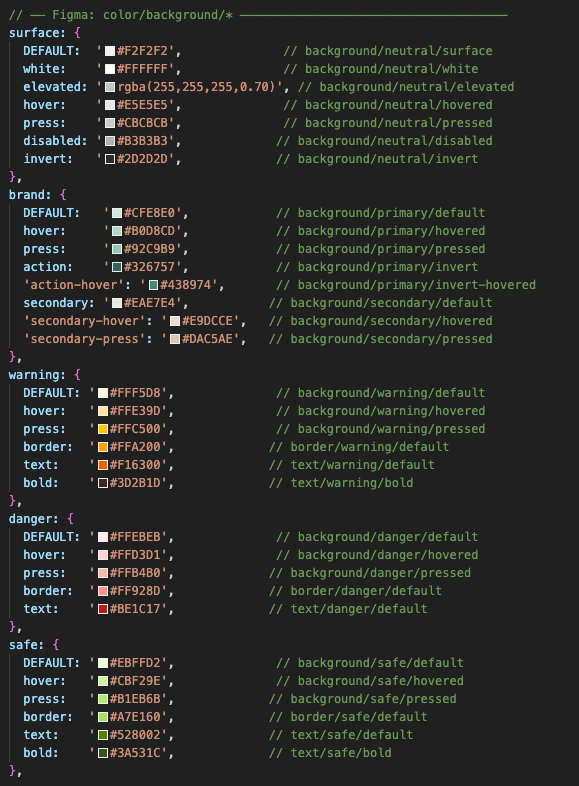
This was the magic moment.
If a designer updates a color in Figma, we export the variables, update the configuration, and the change applies everywhere. The prototype stopped being a static snapshot and became a live expression of our design system.
Step 4: Building a repeatable AI workflow
With the token system in place, I built out the prototype using the principles of atomic design, starting with small elements and building up to full pages.
To make this repeatable, I created a custom Claude skill (a SKILL.md file) that gave the AI strict instructions every time I pasted a Figma link.
The checklist looked like this:
- Load the design system and context
- Verify no duplicate components exist
- Gather missing requirements (states, behaviors, location)
- Generate an implementation plan before writing a single line of code
- Implement the design using token classes
- Run a completion check (Are routes updated? Is it reachable?)
Note: There are still some items that require human judgment. The relationships between nested components, some animation fine-tuning, and states that have yet to be implemented in Figma.
The result: the end of the static prototype
Moving to a coded prototype unlocked two massive benefits:
- We test the UX, not just the UI
A Figma prototype tests if a user can navigate the path you predicted. A coded prototype tests if your design works when a user navigates however they actually want to.
During testing, our users could navigate from a pipeline board, make a live change, open a contact, and jump to a new deal without hitting a dead end. We started finding the real problems our users would face in production, rather than apologizing for broken links.
- The Developer Handoff
Because it’s built on a real token system with resolved interactions, it acts as a flawless living reference. Designers gain authority over how the product actually behaves. Developers spend less time on translation. The gap between what was designed and what gets built gets smaller: not just because the AI is doing more work, but because the artifact moving between disciplines is more precise.
For any designers thinking about trying this, I implore you to do so. Learning to work with Claude Code, setting up a token system, building a custom skill: it’s effortful, but the artifact you end up with is a completely different thing from a Figma prototype. And for testing complex software where you want to correctly capture and refine a multitude of flows, that difference is everything.